
Administration department
Administration and finance on autopilot
Invoices, collections, and reconciliations that process themselves, with traceability and no typing errors.
Request an administration assessment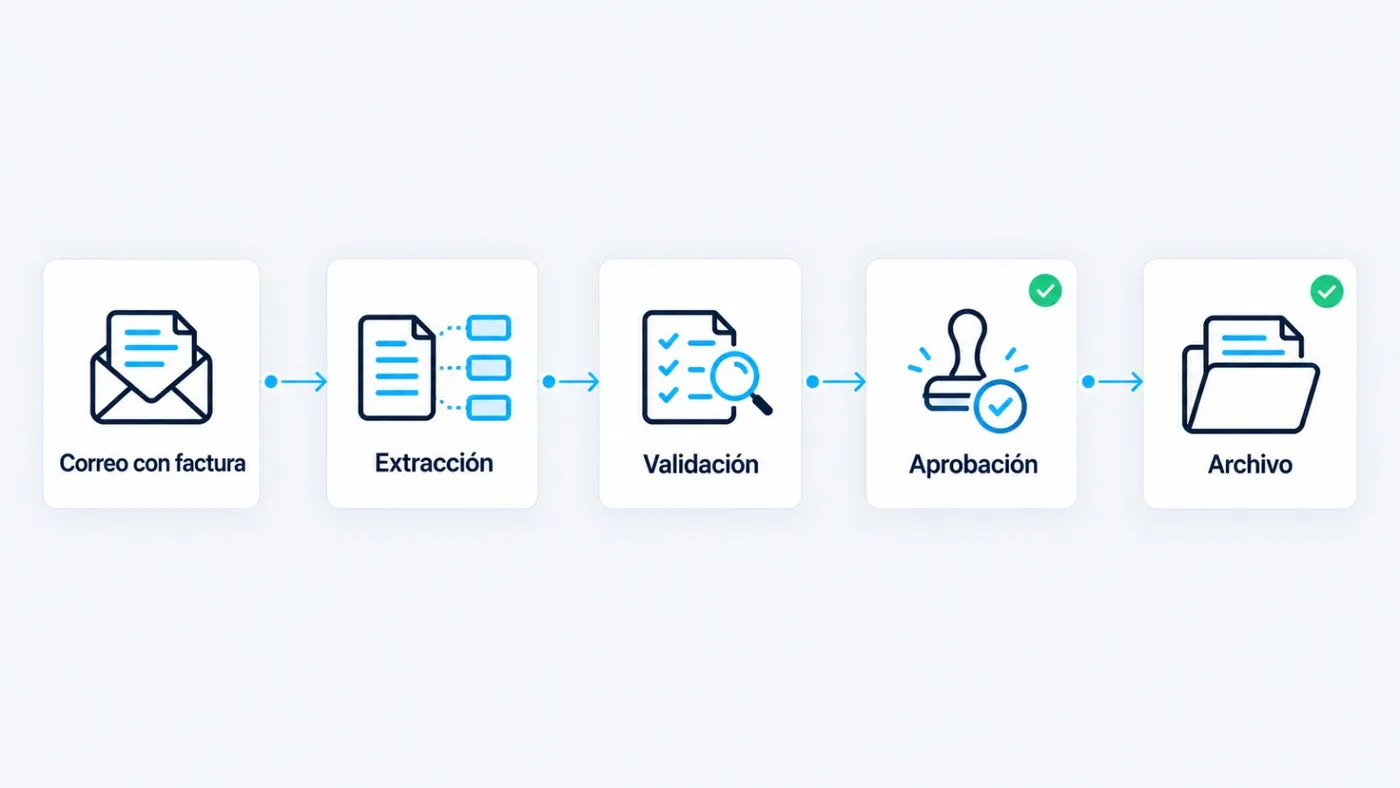
Sound familiar?
- Supplier invoices typed in by hand.
- Outstanding payments chased too late.
- Month-end close that never ends.
- Reports built by copying from three places.
Processes we automate in Administration and finance
-
Supplier invoice reading
Today: PDFs are opened and keyed into the ERP.
Automated: AI extracts the data and leaves it ready to validate.
What improves: Time per invoice
-
Invoicing when work closes
Today: Someone remembers to invoice when the order closes.
Automated: When work closes, the invoice is issued from ERP data.
What improves: Days until issuance
-
Payment reminders
Today: Chased when someone gets round to it—or too late.
Automated: Agreed cadence, with sales copied when relevant.
What improves: Average days to collect
-
Assisted reconciliation
Today: Bank statement against invoices, line by line.
Automated: Suggests matches; a person confirms the uncertain ones.
What improves: Reconciliation time
-
Expense approval
Today: The “can you approve this?” email gets lost.
Automated: Amount and approver rules, with a log of who signed.
What improves: Approval time
-
Periodic financial reports
Today: Copied from three places on the last day of the month.
Automated: The report runs with the same template each period.
What improves: Month-end close time
One process, end to end
From invoice in email to archive
- Invoice arrives by email
- Data is extracted
- Validated against the order
- Recorded
- If above threshold, goes to approval
- Archived
Where AI fits in
- Read invoices, delivery notes, and orders in PDF or photo.
- Detect duplicates and amounts that do not match the order.
- Suggest matches during reconciliation.
If e-invoicing applies to you, we cover it in the assessment with your accountant. We do not state legal deadlines here.
Common tools
- ERP
- Invoicing
- Document management
What we measure
- Time per invoice
- Recording errors
- Average days to collect
- Month-end close time
Frequently asked questions
Does a machine post invoices without anyone looking?
No. It extracts and proposes. Validation and approval stay with you, with thresholds you define.
What if the PDF is badly scanned?
If confidence is low, the document waits in a human queue. Nothing is posted blindly.
Do we have to change ERP or invoicing software?
Not necessarily. We work with the tools you already use.
Is there a trail for every automatic entry?
Yes. Traceability of what was done, when, and from which document. Details are on the security page.
Let us talk about your processes, not technology.
In the diagnostic we review 2 or 3 processes with you and tell you, with numbers, which one to automate first.
Request an administration assessmentReply within 24–48 business hours